Four-column drawing frame
Computer-optimized four-column structure designed for thin-plate drawing, with a simple and practical layout. The hydraulic integrated system uses an independent control unit.
Four-column frame
A four-column platform for drawing.
Open the source tables ↓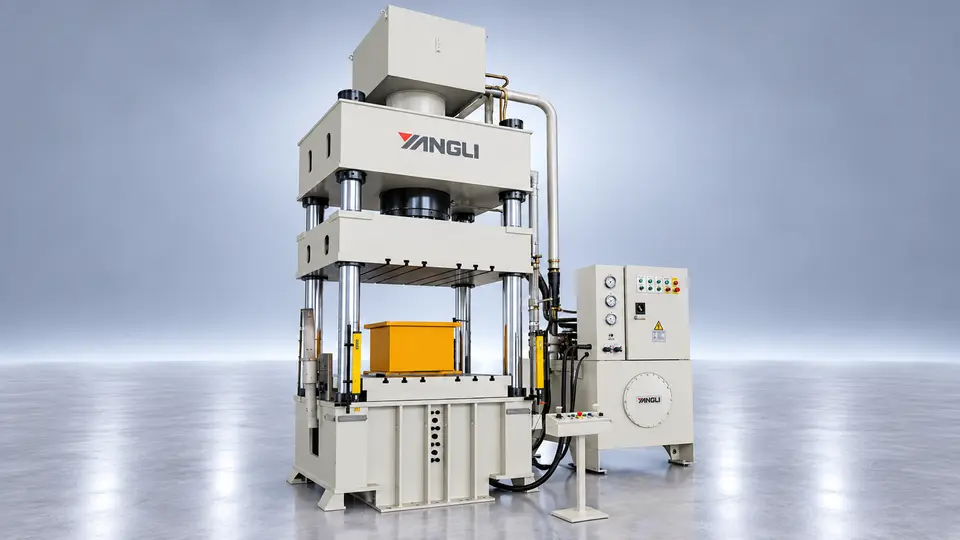
5 models, 2,000 to 6,300 kN. Select a model to open its source table.
A four-column platform for drawing.
Drawing, straightening and assembly across gantry, four-column and single-column platforms.
Use the source-specific technical tables below to check the model and configuration. The part, tooling envelope and transfer requirements are reviewed together before an equipment recommendation.
01Workpiece material and thickness
02Part geometry and tooling envelope
03Required operations and production target
04Feeding, transfer and automation interfaces
Documented in the series source materials.
Computer-optimized four-column structure designed for thin-plate drawing, with a simple and practical layout. The hydraulic integrated system uses an independent control unit.
Four-column frameThe hydraulic control uses a cartridge valve integrated system, providing reliable operation and long service life with reduced hydraulic shock. Integration shortens connecting pipe lines and reduces potential leak points.
Cartridge valve systemA hydraulic cushion under the bolster supports the drawing process, with cushion force from 800 to 2000 kN and cushion stroke from 250 to 350 mm across the range. Ejector holes are arranged in a 150 mm grid pattern over the bolster.
Cushion 800–2000 kNSlide operating pressure, fast idle downstroke and slow pressing stroke ranges can all be adjusted to process requirements. Centralized push-button control offers adjustment and semi-automatic modes, with single-cycle constant-stroke or constant-pressure operation.
Adjust / semi-auto modesPick a source edition, then a model. Tables from different documents are never combined. Request the original when cells are not yet aligned.
Source
Models in this table
Select a model. Drag it onto the Compare tray to pin it; drag a pinned model again to unpin.
Catalog reference. Confirm the ordered configuration with YANGLI.
Share your drawing, material and production requirements. Start with a selected model or explore the equipment direction together.
Discuss your project ↗